
How to Make an International Payment with Belyfted
Belyfted allows you to send money internationally quickly and securely. This guide walks you through the complete process of creating and completing an international transfer from your Belyfted account.
Before You Begin
Make sure you have:
- An active Belyfted account
- Completed any required identity verification
- Recipient banking details
- Sufficient funds available for the transfer
Step 1: Log In to Your Belyfted Account
- Visit the Belyfted platform.
- Enter your login credentials.
- Access your dashboard.
Step 2: Start a New Transfer
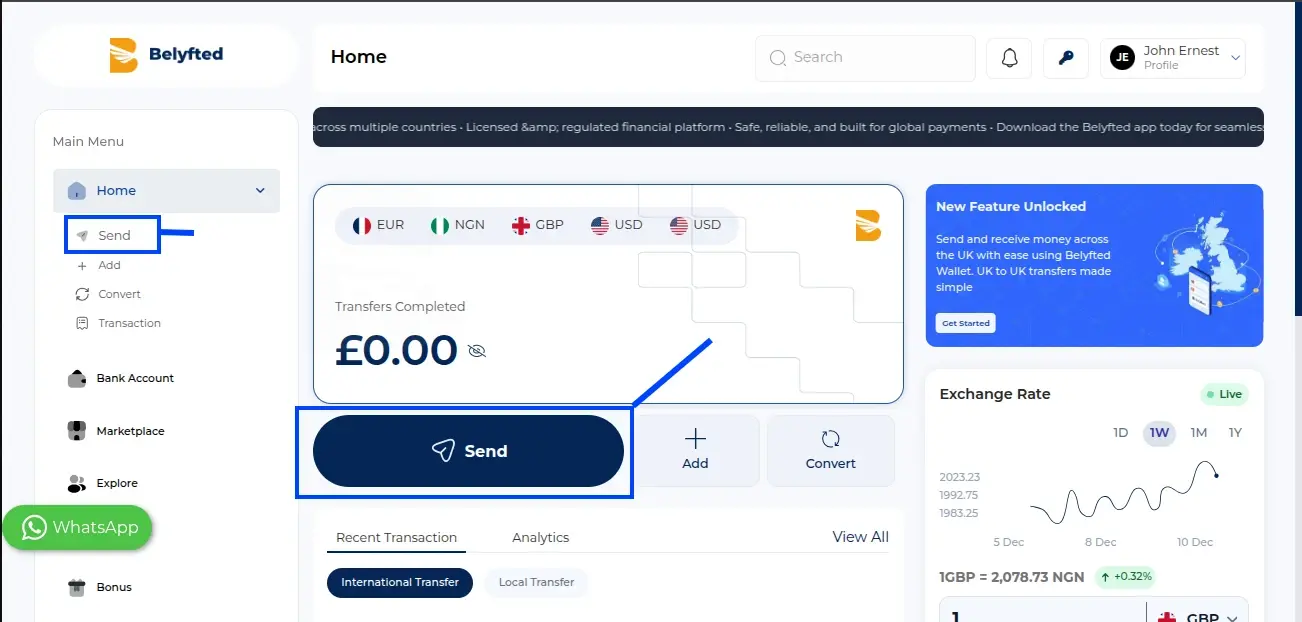
- From the dashboard, cick on Send.
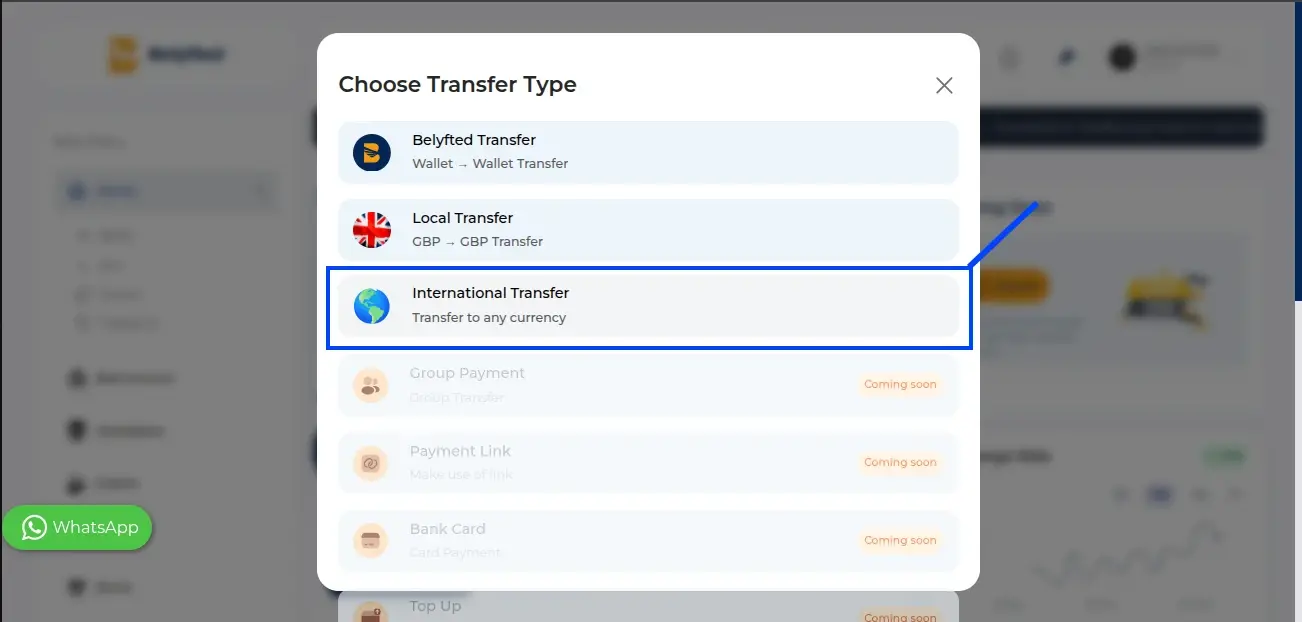
Click International Transfer or the equivalent transfer option.
Step 3: Enter Transfer Details
Provide the following information:
Recipient Country
Select the country where your recipient will receive the funds.
Transfer Amount
Enter the amount you wish to send.
Currency
Choose the sending and receiving currencies if applicable.
The platform will automatically display:
- Exchange rate
- Transfer fees (if applicable)
- The amount will recipient receive
Step 4: Add or Select a Recipient
You can either:
- Select an existing recipient, or
- Add a new recipient
For new recipients, enter:
- Full name
- Bank name
- Account number
- Routing or SWIFT/BIC information (where required)
- Address information (if required)
- or any other information needed by the form
Review all recipient details carefully before continuing.
Step 5: Review Transfer Summary
The review screen displays:
- Sender information
- Recipient information
- Transfer amount
- Exchange rate
- Fees
- Total payment amount
- Estimated delivery amount
Verify that all information is accurate.
Step 6: Confirm the Transfer
- Read and accept any required declarations or terms.
- Click Continue or Confirm Transfer.
Step 7: Complete Payment
Choose your preferred payment method and complete the payment process.
Once payment is successful, Belyfted will begin processing your transfer.
Step 8: Track Your Transfer
After submission, you can monitor the transfer status from your dashboard.
Common statuses include:
- Pending
- Processing
- Sent
- Completed
- Failed
Troubleshooting
Recipient details are not accepted
Verify that the account number, bank details, and country information are correct.
Transfer cannot be submitted
Ensure all required fields have been completed and that your account verification requirements are satisfied.
Payment failed
Check your payment method and available balance before attempting the transaction again.
Related Articles
- How to Add a Recipient
- Understanding Exchange Rates
- Identity Verification Guide
- Transfer Fees Explained